




PC Station T680W / N530W
| 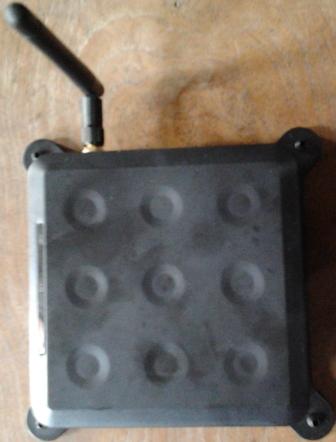 PC STATION N530W |

Teknologi terbaru PC Station T680W / N530W support wifi – wireles atau di kenal dengan pc station wifi. Kami memiliki produk pc station support wifi ini. Jadi lebih memudahkan anda dalam memanajemen pc station tanpa harus ada kabel yang rumit. Support semua type windows, ada 3 port usb high speed 2.0 serta 24 bit display.
 Keunggulan pc station T680W / N530W adalah adanya koneksi ke server melalui kabel LAN dan wifi / wireless sehingga jika di rasa jarak wifi terlalu jauh bisa menggunakan kabel LAN jika di dalam satu ruang bisa menggunakan WIFI.
- Size: Access Device: 100*100 *15 mm; Shipping Size: 235*145*40mm
- Weight: Net Weight: 154g; Shipping weight (includes power adapter, packaging, documentation, etc.): 0.5kg
- Power Supply: Input: 100-240 VAC, 50-60 Hz; Output: 5 VDC, 2 A; Nominal consumption: 5 Watts
- LED Indicators: Power: connection to power supply, LAN: network activity, Ready: device status
- Connection to Host PC: Via 100 Mb/s switched Ethernet connection and WIFI
- Video Resolution: 1280*1024 @85Hz, 24 bit color, Widescreen 1440*900 support
- Audio: Stereo output via speaker port and Mic in via mic port
- Onboard CPU ARM926EJ 533MHz
- Memory Onboard 64 MB RAM
- Interface: Speaker out / MIC in / 3 USB ports / RJ 45 Lan port / TV/WFI port / VGA port / Power IN / Switch on/off
- Internal OS: Windows CE intergrated RDP protocals 5.0
- Supported OS: All windows 32 bit or 64 bit OS(like XP, 2003, 2008, VISTA, WIN7…)
- Kit Contents: PC STATIONS Kit includes access terminal, power supply, software installation & user’s guide and other peripherals are NOT included and must be purchased separately.
Download : user manual T680W, klik disini.
sumber :PC Station T680W / N530W WIFI


 buka control panel -> User Accounts
  create new account
  Pilih limited
  create password pada account yang telah di buat
  pilih tab remote dan klik Select Remote User
  Select Account / User yg sudah di buat tadi
  Tampak user yang telah di beri ijin akses ke server , kemudian Klik OK dua kali


